About this Website
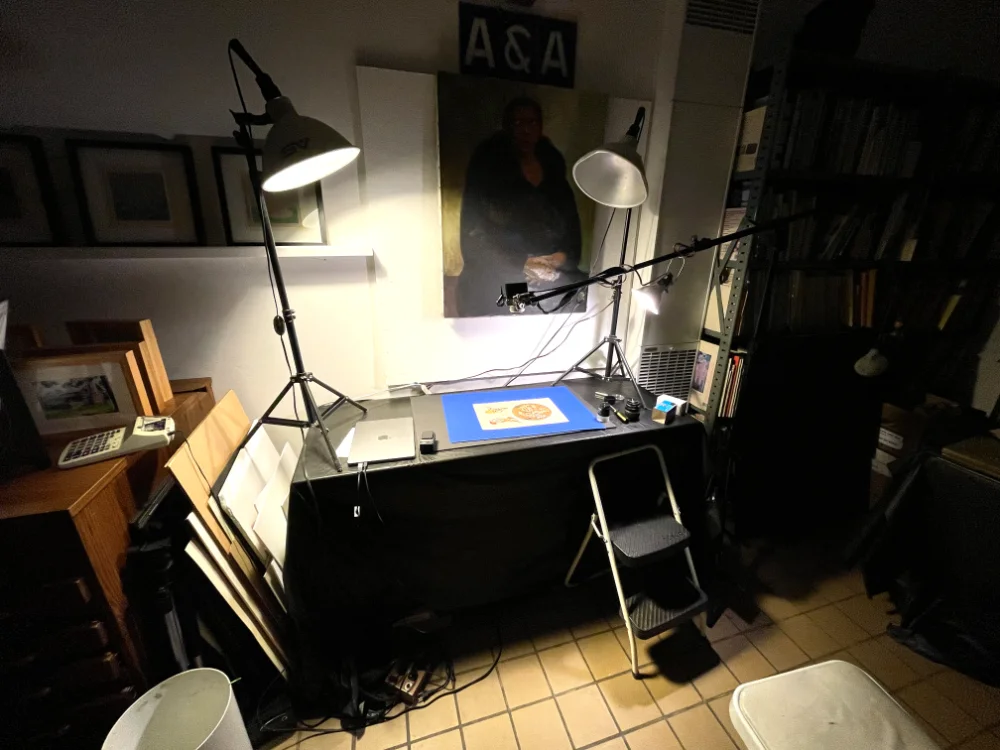
This project was conjured out of the fact that my client is trying to organize her (many) things accrued over the years for eventual sale. As admirable as her collection is, what with the art supplies, artwork, ancient furniture, instruments, tableware, clocks, and just about everything else you can imagine, we knew that we would have to get rid of this stuff someday. Or at least organize it. Thus she asked me if I would be able to digitze some of her collection of items for the eventual sale of these things. One of the things she was hoping to sell is her collection of historic prints. Some of it is old political newspaper front pages like those of Judge and Puck. Some of them are pinup collections from the artist George Petty, and some by Alberto Vargas. Most of them though, are art prints for builders in the late 19th and early 20th centuries. Before there was Pinterest, there was physical inspiration such as these high quality (and fairly well maintained) prints that are now more than a century old.
My first challenge was figuring out how to get a good lighting setup that wouldn't cast shadow onto the paper. Secondly I needed to make sure that all the photos were taken as fast as possible and yet as accurately as possible. Using my Olympus OM-D OM-10 MKIV and my phone as a remote control, this part was fairly easy to plan around. I knew I wanted to model this site after SSENSE, a fashion website of which I particularly like the shopping page. Therefore, I knew I wanted to cut out the backgrounds. In order to make my life easier, I used blue poster board behind the prints and once I was done taking (around 2000) pictures, I moved onto the digital aspect of it.
I knew this part would be simple if I had a way to batch process these photos and remove the backgrounds. I thought maybe I could use affinity's batch processing to remove the blue but then I thought what if it's not specific enough and I end up removing blue in the images too, I don't know how to code for affinity...I had just deleted photoshop too and wasn't exactly sure where to look, so I asked chatgpt what a good solution would be.
Building a pipeline with some manual tweaking and ultimately automatic processing is what I ended up doing. I started with darktable, to adjust colors to try to keep it as consistent as I could. Darktable also has an amazing lens correction feature and more importantly perspective correction. I admit it wasn't always perfect, but I didn't want something 100% perfect. I thought if some were askew it would add to the charm of the site and make the pieces feel more real. From darktable I exported them into large jpeg files, which I knew would be fine as these pictures were about to be compressed to the size of a thumbtack anyway.
The biggest issue then was removing the backgrounds, which chatgpt suggested I use OpenCV for. I tried a couple tutorials on this Python library for a while and then realized it would be much faster to just ask the ai to code something for me to remove the backgrounds. It did this quite quickly and it only took some tweaking but I am fairly happy with the results! I then went back into manual mode and used finder on my mac to put tags on them depending on the type of collection they are from. Once sorted, I was able to use another OpenCV method to convert from jpeg to webp and this brought the file size down more than tenfold. It was honestly very impressive. Finally I renamed these webp files automatically by using another python script to batch rename the files.
Overall I can't say that I have learned much about how I would actually program this, and wouldn't be able to remember the syntax of python or OpenCV's method names, but this was the perfect use of ai for me. It automated the process, but I made sure it did so in small steps so nothing coming out the other end was all too surprising.
Finally once my images were done, I got to the fun part of coding the website. I found a way to use PHP to load the images automatically into a page, and I am very pleased with the resulting website.
Process overview:
Set up Rig > Photograph Prints > Process RAW in Darktable > Export JPEG > OpenCV / Python Background Removal > Export PNG > Reorder PNG Files by Artist > OpenCV / Python Convert to WEBP > Batch Rename Files > Build Website
If you would like to check out my other projects, check out my portfolio here, and if you want to buy prints or digital copies (raw, jpeg, and png) email me at remy.door@gmail.com